
Architecture spec
The long-form design doc — protocols, crypto, invariants.
The long-form companion to the Configuration, CLI, and REST API references. It explains why the daemon looks the way it does — the protocols, the crypto, the trust boundaries, and the small set of invariants every later chapter takes for granted.
The shape of MeshHold is a single binary that is, at once, your local store, your gossip relay, your VPN exit, your chat server, and your S3 endpoint. All of those layers share one Go process, one libp2p host, one Badger metadata store. That is the trick. Most of the design below is a consequence of collapsing those roles into one box.
1. The shape of the system
A MeshHold network is a set of peer nodes speaking libp2p over a shared
swarm key. There is no central directory, no coordinator, no DNS-rooted
identity. Every node is symmetrical at the protocol level; the asymmetry comes
from configuration — which vault keys a node holds, whether it is marked
reliable, which mgmt keys it has provisioned.
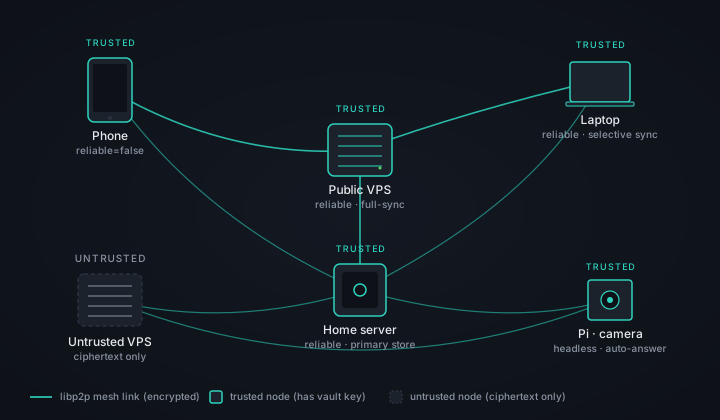
The diagram is deliberately heterogeneous. A trusted home server, a public VPS, a phone, a cheap untrusted VPS holding only ciphertext, a Raspberry Pi camera — none of them are special at the network layer. Their roles differ only in which keys are present and which transports are enabled.
What MeshHold deliberately is not:
- Not a blockchain. No global ledger, no global consensus, no proof-of-anything.
- Not federation. Nodes do not route on behalf of "users on other servers". An identity (a peer id) lives on exactly one daemon at a time.
- Not a CDN. Replication is targeted at durability and locality, not at edge caching for unknown clients.
- Not a public network. A node with no swarm key can't open a connection. Everything below assumes you're already past that gate.
2. The node daemon
One Go process per machine, organised in four cooperating layers.
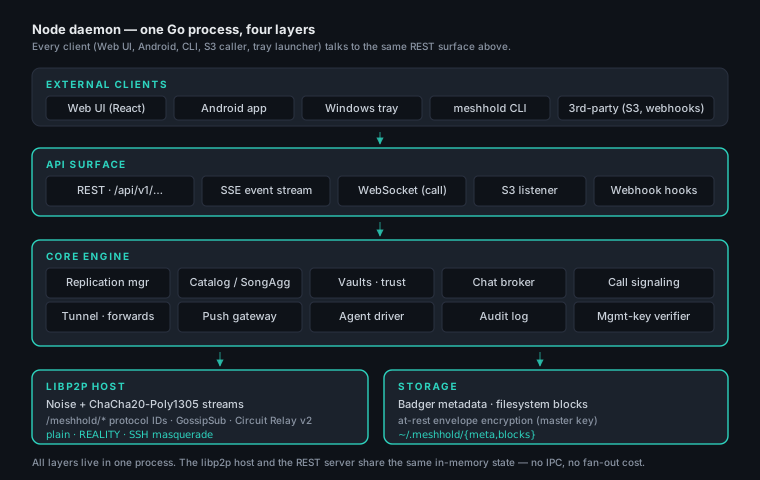
- External clients — the bundled Web UI, the Android app, the Windows
tray launcher, the
meshholdCLI, plus any third-party that wants to talk S3 or post a webhook. - API surface — REST for state-changing calls, Server-Sent Events for the live event stream, WebSockets for call media, an embedded S3-compatible endpoint, inbound webhook receivers. All on the same listener.
- Core engine — replication manager, catalog/SongAgg, chat broker, call signaling, tunnels, agent driver, audit log, mgmt-key verifier. These talk to each other through Go channels and the shared metadata store, not through internal RPC.
- libp2p host + storage — one libp2p host with all
/meshhold/*protocol handlers registered, on top of a Badger metadata store and a blocks directory on the filesystem.
The single-process design is load-bearing. The replication manager can read a holders table in microseconds. The chat broker can hand a freshly-decrypted message to the SSE fan-out without a network hop. The tray launcher's loopback REST request and the libp2p stream from a remote peer end up in the same handler with the same authz check.
Disk layout
On Linux the base is ~/.meshhold/; on Windows it's
%LOCALAPPDATA%\MeshHold\. The interesting subdirectories:
| Path | Purpose |
|---|---|
meta/ |
Badger key-value store: vaults, holders, peers, chats, agent sessions, audit log. |
meta/node.key |
The node's libp2p Ed25519 private key. Wrapped by the at-rest master key when enabled. |
meta/networks.json |
Saved networks and their swarm keys, plus which one is active. Wrapped by the at-rest master key when enabled. |
meta/master.key.* |
The at-rest master key, wrapped by the OS keystore (.dpapi) or bound to the host (.host). Absent when at-rest encryption is off, or when a passphrase_file supplies the key instead. |
blocks/ |
Convergent ciphertext blocks, content-addressed by SHA-256. |
vaults/<id>/ |
Trusted-vault plaintext folders (only for trusted nodes). |
audit.log |
Append-only, signed audit trail. |
config.yaml |
The single source of truth at startup. See the Configuration reference. |
Nothing outside this base is read or written, with three exceptions: the
optional system-VPN helper service on Windows, the OS keystore when
at_rest_encryption.enabled is set (DPAPI, Keychain, Secret Service,
Android Keystore), and /etc/machine-id on a headless Linux host, which
the host-bound key file derives from.
3. Identity, swarm, peer discovery
Every node has a stable peer id derived from an Ed25519 keypair stored in
meta/identity.key. The peer id is what every other surface references — the
holders table, mgmt-key grants, audit log all pivot on it.
The swarm key is a 256-bit shared secret in libp2p's standard
/key/swarm/psk/1.0.0/ format. It is the outer gate to the mesh: libp2p
refuses to complete a connection if the peer can't prove possession of the
same PSK. A node booted without a swarm key joins "limited mode" — the REST
API and S3 listener come up, but the P2P stack is dormant.
Peer discovery happens four ways, in roughly this order:
- bootstrap_peers — config-supplied multiaddrs the daemon dials at start.
/meshhold/hello/1.0— on every fresh connection, peers exchange the list of other peers they've seen recently. A single working bootstrap eventually yields the whole reachable mesh.- mDNS — for LAN. Disabled on hardened nodes via
node.mdns_enabled: false. /meshhold/topology/1— a GossipSub topic where every node publishes a periodic summary (its current peer set, capabilities, mv-bytes counters). This is what powers the Network page in the Web UI.
NAT'd peers are reached two ways, neither of them libp2p's.
A hole punch of our own (/meshhold/punch/1.0) gets a direct path between
two NAT'd nodes: both sides dial each other from the port they listen on, at a
moment they agree over a relayed path, so each side's outbound packet opens the
binding the other side's needs. It runs on UDP and on TCP, which is what covers
a network that passes no UDP at all.
When a punch cannot work — a symmetric NAT rewrites the port the peer was told about, and no timing fixes that — traffic is relayed by a node on the route. That needs nothing volunteered: reachability is announced in the topology beat, a route is a chain of neighbours, and a node in the middle forwards a hop without knowing what is inside it.
libp2p's Circuit Relay v2, AutoNAT, AutoRelay and DCUtR were all removed, after being measured to carry no traffic in a mesh this size.
4. Blocks and convergent encryption
Files become blocks. Chunking happens on the plaintext, and the chunk size depends on the size of the file:
| File size | Blocks |
|---|---|
| ≤ 512 KiB | one block — the whole file |
| 512 KiB – 100 MiB | 512 KiB each |
| > 100 MiB | 4 MiB each |
Each chunk is then sealed on its own.
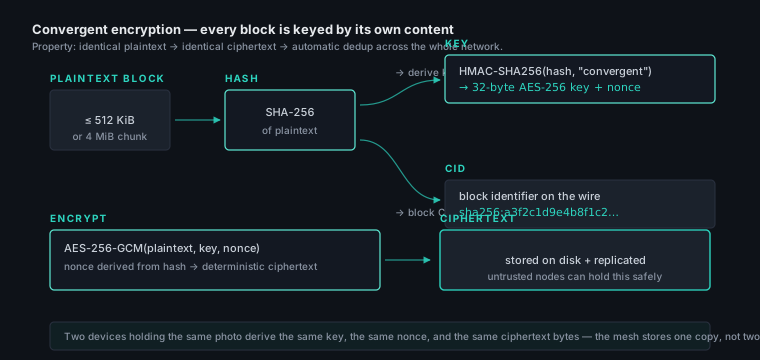
The key is per vault, not per block. It is derived once, from the vault's key material:
master = Argon2id(passphrase, salt="meshhold-v1", t=3, m=64 MiB, p=1)— 32 bytesencrypt_key = HKDF-SHA256(master, info="encrypt")— the AES-256 key for the whole vaultvault_id = HKDF-SHA256(master, info="vault-id")— 16 bytes, rendered hex
What is derived per block is the nonce, and that is where the convergent behaviour comes from:
nonce_key = HMAC-SHA256(encrypt_key, "meshhold-nonce-v1")nonce = HMAC-SHA256(nonce_key, plaintext)[:12]— deterministic, no RNGblock = nonce ‖ AES-256-GCM(plaintext, encrypt_key, nonce) ‖ tag— 28 bytes of overheadblock_hash = SHA-256(block)— the identifier on the wire and on disk
A file's content_hash is SHA-256 over its blocks in order — over the
ciphertext, so a node that cannot decrypt a file can still verify it is
holding the right bytes for it.
What deduplicates, and what doesn't. Identical plaintext in the same
vault produces an identical nonce, identical ciphertext and therefore an
identical block_hash: the same file stored twice, or replicated to ten
devices, costs one copy of each block. Across vaults it does not
deduplicate — two vaults encrypt under different keys, so the same photo
in each yields unrelated bytes. That is a consequence of one key per
vault, and it is what stops an untrusted node holding blocks for several
vaults from learning which of their contents overlap.
The caveat that comes with it. A deterministic nonce means an attacker able to submit chosen plaintexts to a trusted node, and to see that vault's stored blocks, can tell whether the vault already holds a given block. MeshHold's threat model — the mesh is yours, untrusted nodes store bytes but never hold the key — makes that an acceptable price for content-addressed storage, and it is bounded by the vault rather than global. Adversarial multi-tenancy inside one vault would need a different construction.
5. Hash chains and versioning
Files are mutable. To track versions without a central coordinator, every
file carries a hash chain: a sequence of content_hash pointers, each
referencing the previous version. A version record is metadata, not a copy —
old plaintext is not preserved.
v1 (alice)        v2 (alice)         v3 (alice)
 ┌────┐  parent    ┌────┐  parent     ┌────┐
 │AAA │ ◀──────── │BBB │ ◀────────── │CCC │   linear history
 └────┘           └────┘             └────┘

                  v2' (bob, offline)
                   ┌────┐
                   │DDD │   ◀── fork: BBB has two children
                   └────┘
When two devices edit the same file while disconnected, the resulting chain forks. The catalog gossip surfaces this on the next sync; the user is shown both heads and asked to resolve. Forks are visible to every node in the swarm, including untrusted holders — that is what lets an untrusted node know when its locally-held ciphertext is stale and eligible for eviction.
6. Vaults
A vault is the unit of access. Concretely, it's a tuple of:
- a stable id and human name,
- a content key (or absent, if this node is untrusted for it),
- a policy (replication factor, hard quota, retention),
- a type:
folder,chat,tunnel, oragent.
The type determines the API surface mounted on top:
| Type | API | Stored bytes |
|---|---|---|
folder |
/api/v1/vaults/{id}/{path:*} — files and folders |
encrypted block tree |
chat |
/api/v1/rooms/{id}/messages — chat history |
encrypted message log |
tunnel |
/api/v1/tunnels/{id} — capability grants |
tunnel scope + mgmt keys |
agent |
/api/v1/sessions/{sid} — AI agent state |
session transcripts + attachments |
Trust is a per-vault property of the node, not of the user. A laptop can be trusted for the family-photos vault and untrusted for the company-secrets vault; the latter case sees only ciphertext blocks it helps replicate.
7. Replication
Each vault declares a replication factor — how many reliable nodes should hold every block. Replication is gossip-driven, not coordinator-driven:
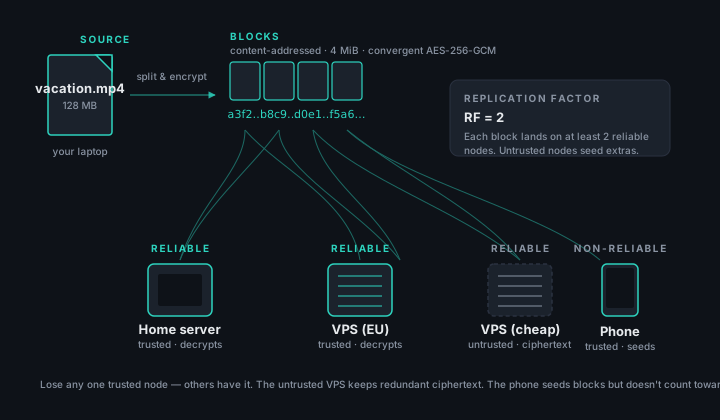
The mechanism in steps:
- When a node accepts a new block (write from a local client, or fetch from
a peer), it publishes a
block-have(cid, vault)announcement on the/meshhold/replication/<vault>pubsub topic. - Every member of the swarm keeps a holders table —
cid → set of peer ids
   that announced have
. The table is bounded bynode.holder_ttl; entries expire if not refreshed. - A periodic replication cycle (
node.replication_min_period.._max_period) walks every block this node is interested in, asks the holders table how many reliable peers currently hold it, and either fetches a copy (if short) or volunteers to drop one (if over RF and tight on disk). - Block transfer happens over
/meshhold/block/1.0— one stream per block, length-prefixed.
reliable: true means "long-lived holder candidate". Servers and VPS default
to true; phones default to false. The replication scheduler counts only
reliable peers when computing current_count, but accepts blocks from
anyone. A non-reliable peer participates in distribution without inflating
the RF math.
When the mesh has no reliable peers at all (a user with only phones and
laptops), the math collapses gracefully: current_count never reaches RF,
so every peer with free disk just takes a copy. Data ends up on every
device — exactly what the user wants.
8. Mesh topology and gossip
A small fixed set of GossipSub topics carries everything that's not a direct RPC:
| Topic | Carrier of |
|---|---|
/meshhold/topology/1 |
Per-node summary heartbeat (peers, caps, byte counters) |
/meshhold/replication/<vault> |
block-have / block-want announcements |
/meshhold/chat/<room> |
Live chat messages for a single room |
Hello (/meshhold/hello/1.0) is not gossip — it's a direct RPC on every
fresh connection. Catalog (/meshhold/catalog/1.0) is also direct: when a
node opens a fresh connection and shares a vault, the two peers exchange
their per-vault catalog state (Merkle tip + a delta).
Bandwidth budgeting matters at scale. The /meshhold/speedtest/1.0 protocol
is a short ping-pong that fills the topology heartbeat's mv_bytes counters
shown on the Network page.
9. Protocol map
The complete set of /meshhold/* protocols the daemon registers on its
libp2p host:
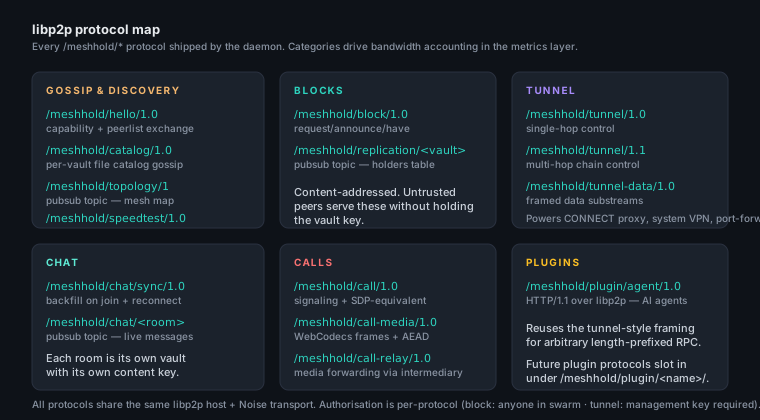
A few invariants:
- Versioning is in the path.
/meshhold/tunnel/1.0is single-hop;/meshhold/tunnel/1.1is multi-hop. A peer that supports only1.0is silently treated as single-hop-only. - Authorisation is per-protocol. Anyone in the swarm can dial
/meshhold/block/1.0. Only a peer presenting a current mgmt-key proof can dial/meshhold/tunnel/1.1with the tunnel cap. The verifier lives next to the handler. - Block bandwidth is categorised. The metrics layer
(metrics/categories.go) classifies
every protocol into
Block/Tunnel/Chat/Gossipbuckets so the Network page can render coloured throughput rings.
10. Transports and obfuscation
The libp2p host can bind multiple transports simultaneously. Out of the box:
- plain TCP — the default. Noise handshake over TCP. Fast, and wants a port of its own.
- REALITY — shares
443with a web server. The listener peeks at the ClientHello before any TLS state machine runs: an auth marker insession_idroutes to the mesh, anything else is spliced tonode.obfs.reality.destuntouched, ClientHello and all. Visitors get the front server's own certificate; MeshHold never terminates their TLS. - SSH — shares
22with sshd, same gateway shape. A valid auth frame after the banner exchange routes to the mesh; anything else is spliced tonode.obfs.ssh.dest, so a prober completes a genuine key exchange against a genuine host key. The served identification string is read from that backend rather than configured — RFC 4253 §8 binds both identification strings into the signed exchange hash, so an invented one would break every forwarded login. Without adestthe listener falls back to a syntheticKEXINIT+DISCONNECT, which survives a passive scan but not a prober that pushes past it.
Both gateway transports authenticate before the mesh service is reachable, so an unauthenticated scan sees only the fronted server — the same property as single-packet authorisation. That also means the connection is shaped like ordinary HTTPS or SSH on the wire, which is what keeps a node reachable on networks that drop protocols they don't recognise.
node.obfs.order controls outbound dial priority. Where only familiar
protocols pass, put ["reality", "ssh", "plain"] so the daemon tries
the port-sharing transports first and falls back to plain TCP on a
network that accepts it.
11. Tunnels and port forwarding
A tunnel is a length-prefixed bidirectional substream routed across one or more relay hops. The same primitive powers everything that needs "talk to something behind a NAT":
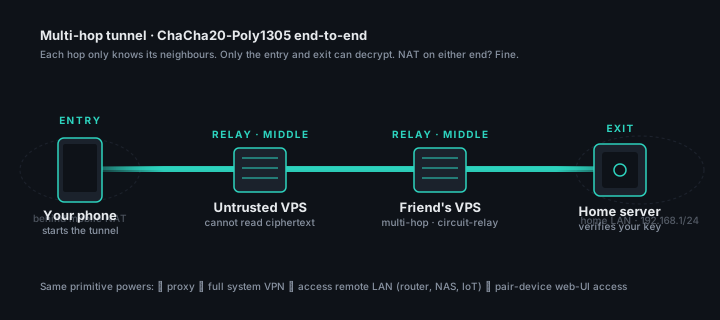
The control protocol is /meshhold/tunnel/1.1 (chained); the data plane is
/meshhold/tunnel-data/1.0. A tunnel-open request carries:
- the target peer id at the far end,
- the protocol id the far end should dial when the substream is mounted
(e.g.
/meshhold/block/1.0for block transfer, an arbitrary port number for port-forward), - a mgmt-key signature with the
tunnelcapability.
The chain works by having each hop recursively open a fresh tunnel to the next hop, carrying the original request. Hops only know their immediate neighbours. The end-to-end stream is wrapped in a fresh Noise session authenticated by the entry/exit peer ids — middle hops see ciphertext, even though they're already inside the swarm-keyed connection.
Port forwarding is ssh -L / ssh -R / ssh -D reimagined: the
Port Forward feature reuses the
same tunnel machinery, with a TunnelListenRequest that asks a remote peer
to listen on a host:port and forward connections back through the tunnel.
The @reverse/<id> sentinel in the substream protocol marks it as the
"server pushes to client" variant.
The dynamic direction adds nothing to the wire at all: the node serves
SOCKS5 locally and opens one ordinary substream per destination a client
asks for, each carrying its own dest header. The exit cannot tell those
apart from a fixed forward's, and gates them on the same mgmt-key scope
rules — which is also why a scoped key still bounds where a SOCKS5 client
can reach.
12. Chat
Chat rooms are vaults of type chat. Each room has its own content key,
shared on invite. Two protocols carry messages:
/meshhold/chat/<room>— a GossipSub topic for the live path. A freshly-posted message hits every connected member within sub-second./meshhold/chat/sync/1.0— a request/reply protocol for backfill. When a peer (re-)joins, it asks an active member for "messages sincelast_seq" and replays them.
Messages are AEAD-encrypted with the room content key before being published, so an untrusted holder of the room's ciphertext blocks (if you've chosen to replicate chat history into a vault) sees only opaque bytes.
Background notifications for chat messages are produced locally on each device — see background notifications below.
13. Calls
Audio and video calls run over libp2p using two protocols:
| Protocol | Purpose |
|---|---|
/meshhold/call/1.0 |
Signaling: ring, accept, hang up, ICE-equivalent capability ads |
/meshhold/call-media/1.0 |
Media: WebCodecs-encoded frames wrapped in ChaCha20-Poly1305 |
/meshhold/call-relay/1.0 |
Forwarding when the two endpoints can't connect directly |
The browser side uses WebCodecs for encode/decode (H.264/Opus by default; falls back to VP8). The audio/video frames are not WebRTC — they are framed inside our own length-prefixed media protocol, AEAD-wrapped with a per-call key, and shipped over a normal libp2p stream. That keeps the crypto in our hands (the same Noise + content-key stack as the rest of the system) and lets a relay node forward frames without ever decrypting them.
The caller of a video call can switch the callee's camera input
remotely (CameraControl{NEXT|PREV|SPECIFIC}, gated on the mgmt-key
camera capability) — built for the surveillance pickup scenario.
Zoom + pan is symmetric: either party can zoom and pan the camera
they're watching (up to 10×), driven by gestures directly on the video —
mouse wheel to zoom + click-drag to pan on desktop, pinch + one-finger
drag on touch, with geometric (logarithmic) zoom steps. It is a
sender-side digital zoom: the side whose camera is being zoomed crops the
requested window (centre offset by pan_x/pan_y) out of each captured
frame before encoding, so only the zoomed-in region is encoded and sent —
on a camera that captures more than the call's coded size the picture
barely softens and the uplink never grows. Zoom + pan are absolute
(CameraControl{ZOOM}) so a dropped message can't desync the two ends.
(Applies to browser-based endpoints; the headless Pi-camera pipeline
does not implement crop.)
Group calls (more than two parties) are not in scope — see non-goals.
14. Background notifications
Chat and call notifications are produced locally by the device's own
daemon — there is no external push service in the loop. On Android the
daemon runs as a foreground service; its native ChatListener /
CallListener raise a system notification + sound the moment a non-self
message or incoming call is first seen, whether it arrived via live gossip
or a background-sync pull, and independent of whether the WebView is alive.
A periodic WorkManager job is the fallback that reconnects and pulls missed
messages during Doze maintenance windows; it shares the notification id
with the live listener so the two never double-ping.
This means notifications depend on the daemon being allowed to keep running. On aggressive OEM ROMs that kill background services, exempt MeshHold from battery optimization so the foreground service survives.
15. AI agents
An agent instance is a vault of type agent plus a driver (Claude Code,
OpenCode, Gemini CLI). The driver runs the chosen CLI as a child process, with
CLAUDE_CONFIG_DIR / equivalent pointed at a per-instance directory inside
meta/. Sessions, transcripts, attachments, and MCP approvals are all
stored back in Badger.
Each driver speaks its CLI's native automation protocol and normalises it
onto one internal SessionBackend interface — Claude Code over stdin/stdout
stream-json, OpenCode over its HTTP/SSE serve daemon, and Gemini CLI over
ACP (Agent Client Protocol: JSON-RPC 2.0 on stdio, gemini --acp).
Gemini instances are HOME-isolated: each gets its own ~/.gemini (settings,
API key in .env) and its own process, so multiple Google identities coexist
on one node. (MCP-server management is wired for claude and opencode; gemini's
ACP mode blocks session creation with an MCP server configured, so it's not
exposed there yet.) Tool-call approvals from every driver land on
the same in-daemon approval flow.
Remote access goes through /meshhold/plugin/agent/1.0 — an HTTP/1.1 stream
over libp2p, much like the tunnel protocol but with HTTP semantics on top.
The Web UI on device A can hit /api/v1/sessions/... on its local daemon,
which transparently routes the request via the agent plugin protocol to the
node that actually hosts the agent instance.
Crucially: agents do not get vault tools. The driver only exposes the chat surface (prompt, attachments, model selection, approvals). MCP servers are scoped per instance. The tenant boundary is the user, not the node — see the trust diagram below.
16. The S3 listener
When node.s3.enabled: true, the daemon mounts an embedded S3-compatible
HTTP listener on node.s3.listen_addr (default 127.0.0.1:3900, loopback to
prevent accidental exposure).
- Buckets = vault aliases.
s3://meshhold/photos/holiday.jpgresolves by looking up "photos" in the per-key bucket map; the rest of the path is a vault path. - Sig v4 only. The
Authorizationheader carries it; the query-string (presigned-URL) variant is not wired, so there is no way to hand out a link that downloads or uploads an object on its own. The Sig v4 scope's region isnode.s3.region(defaultmeshhold). - Path-style by default. Virtual-hosted style (
<bucket>.<base_domain>) activates only whennode.s3.base_domainis set.
The single-PUT cap (node.s3.max_put_bytes, default 64 MiB) forces large
uploads to multipart, which lets the convergent-encryption layer chunk on
the same 4 MiB boundary the rest of the system uses.
17. The REST API surface
Everything every UI does is REST. See the REST API reference for the full catalogue. A few cross-cutting invariants worth highlighting here:
- Bearer auth on every state-changing route. The bearer is minted by
POST /auth/loginagainst the Web UI password, or byPOST /auth/bootstrap-exchangeagainst a one-shot ticket from the tray launcher's loopback IPC pipe. - SSE for events.
GET /events/streamstreams every state-change event the caller is authorised to see — vault updates, holder changes, call rings, agent stream events. Web UIs subscribe once. - WebSocket for two media surfaces only.
GET /calls/{id}/mediaandGET /rooms/{id}/stream— both because they carry binary frames. - Errors are uniform.
{"error":"message"}plus a non-2xx status.507 Insufficient Storageis the only "special" status, used to surface vault hard-quota hits with extra fields.
18. Trust boundaries
There are three independent gates, and a role is the cartesian product of which gates you've passed:
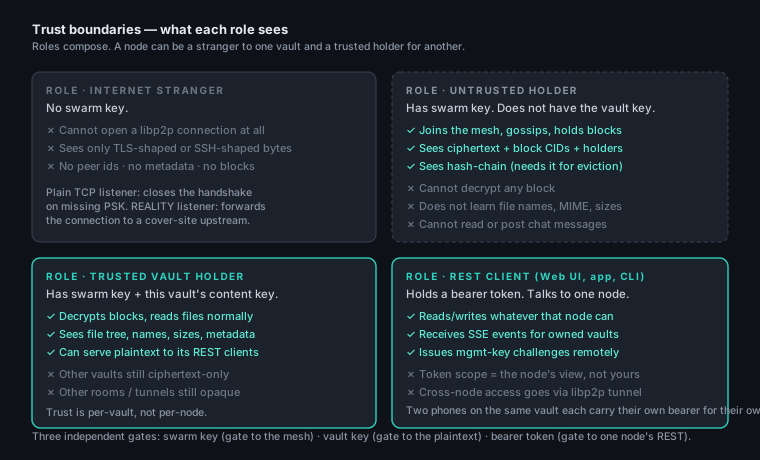
A few easy mistakes to avoid:
- A bearer token grants whatever the node can see, not whatever the user owns. If Alice's laptop and Alice's home server both speak the same vault, she still needs two bearers — one for each daemon. The daemons talk to each other through libp2p tunnels, not by sharing tokens.
- An "untrusted" node is not "less trusted by reputation". It's just a node without that vault's key. The same node is fully trusted for vaults whose keys it does hold.
- The swarm key is not the vault key. Losing the swarm key locks you out of the network; losing a vault key locks you out of a vault. A network rotation does not invalidate vault content.
19. Invariants and non-goals
Things the daemon promises will always be true:
- Identical plaintext → identical block bytes on the wire and on disk. Convergent encryption is the dedup primitive.
- A peer with no swarm key cannot complete a libp2p handshake. Limited mode runs the REST/S3 listeners only.
- Replication is per-block, not per-file. Small files don't pay the cost of large ones.
- Block bandwidth is bounded by
node.blocks_max_bytesandnode.blocks_reserve_bytes. Replication evicts before either limit is crossed. - The mgmt-key verifier is the only path to tunnel/camera caps. No
flag, no special peer id, opens those gates. The
MgmtKeysPanelis the user-facing surface.
Things MeshHold deliberately does not do:
- No group calls. 1:1 calls only. Group multimedia is a separate set of problems (mixers, jitter buffers, SFU vs. MCU) that we chose not to inherit.
- No CRUD for webhooks. Inbound webhook routes are config-only. A web surface for them would let a compromised bearer turn the daemon into an arbitrary HTTP-egress device. Config files require shell access.
- No outbound HMAC signing on webhooks. The receiver authenticates by the URL secret in the path, full stop.
- No interactive prompts in the CLI. Every
meshholdsubcommand is scriptable. The interactive flows live in the Web UI. - No random-nonce mode for blocks (yet). Convergent dedup is the default. A future opt-in random-nonce vault flag is on the roadmap.
20. Where this leaves you
If you want to read the code, the starting points are:
- internal/p2p — every
/meshhold/*protocol implementation. - internal/replication — the holders table and replication cycle.
- internal/vaults — vault types, trust resolution, convergent encryption.
- internal/tunnel — the multi-hop tunnel machinery; everything else that needs "reach a peer through other peers" is a thin wrapper around it.
- internal/agent — the agent driver, OpenCode/Claude Code integrations, plugin protocol.
- internal/api — the REST layer and SSE fan-out.
The Configuration reference is the inventory of every knob; the CLI reference is the operator surface; the REST API reference is what every client looks like from the outside. This document is the reason they all fit together.